Friday, December 31, 2021

Last Day, One Last Article in 2021...

@GWT Community: many thanks for all the supports and answers for all my questions!

All the best for GWT / J2CL the best ever Java web browser based framework. Hope to see bigger community for 2022.

One last article for 2021 on the last day in 2021: All Things in 2021 😉😅

https://bit.ly/AllThingsJava2021

Enjoy reading and all the best for 2022!
Lofi

--
You received this message because you are subscribed to the Google Groups "GWT Users" group.
To unsubscribe from this group and stop receiving emails from it, send an email to google-web-toolkit+unsubscribe@googlegroups.com.
To view this discussion on the web visit https://groups.google.com/d/msgid/google-web-toolkit/ef2de1cf-c489-476a-adfa-0b711d6dde0an%40googlegroups.com.

Sunday, December 12, 2021

HOW TO MAKE MY SMART GWT WEB APP MOBILE

i have challenges with listgrids when it comes to making my mobile application user friendly and the buttons not reducing in size
technology
smart gwt version 6.1
my page is not responsive


--
You received this message because you are subscribed to the Google Groups "GWT Users" group.
To unsubscribe from this group and stop receiving emails from it, send an email to google-web-toolkit+unsubscribe@googlegroups.com.
To view this discussion on the web visit https://groups.google.com/d/msgid/google-web-toolkit/CAMjva70Uj75Y4rF_Pt2EPW2j_%3D6WiXhFJDfWXb8MiyvbFb1yhg%40mail.gmail.com.

Wednesday, November 24, 2021

Learn more about our updated Terms of Service

vaughnjjoan@gmail.com

On January 5, 2022, we're making some changes to our Terms of Service. These changes won't affect the way you use Google services, but they'll make it easier for you to understand what to expect from Google — and what we expect from you — as you use our services.

You can review the new terms here. We've also provided a summary of the key changes. At a glance, here's what this update means for you:

  • More clarity on what you can expect from Google and what we expect from you: We're providing more examples to describe the mutually respectful conduct that we expect from all our users. We're also providing more transparency about how we develop, improve, and update our digital content, services, and goods – including more detail about the reasons we make changes and legally-required updates, the advanced notice we provide to you, and your right to withdraw from your contract with us.
  • Legal guarantee: We're summarizing the legal guarantees that you receive under EEA consumer laws when you use our digital content, services, and goods.
  • Withdrawal right: We're providing information about your legal right to withdraw from the terms within 14 days of agreeing to them if you're a consumer based in the European Economic Area (EEA). We're also including a copy of the EU Model Instructions on Withdrawal in case you want to exercise that right.
  • Additional definitions: We're adding more explanatory text to help you understand certain legal concepts that we refer to in our terms, including "commercial guarantee", "legal guarantee", and "lack of conformity".
  • Improved readability: While our terms remain a legal document, we've done our best to make them easier to understand, including reorganizing some topics so that they're easier to find.

If you use Family Link to manage a Google Account for someone else, please take some time to talk to them about these changes.

Thank you for using Google!

Google Ireland Limited, Gordon House, Barrow Street, Dublin 4, Ireland

You have received this email to update you about important changes to Google's Terms of Service.

Sunday, November 14, 2021

Re: Can't upgrade my Gwt 2.4. Where did the "gwt-html5-storage.jar" dissapear?

Thank you so much Thomas, deeply appreciated...

On Sunday, November 14, 2021 at 7:53:35 PM UTC+3 t.br...@gmail.com wrote:
You don't need it anymore: http://www.gwtproject.org/doc/latest/DevGuideHtml5Storage.html
(basically change your imports from com.google.code.gwt.storage to com.google.gwt.storage, there might be other changes needed, I never did such migration myself)

On Sunday, November 14, 2021 at 5:28:38 PM UTC+1 Haluk Acar Güner wrote:
Since the punch cards for the last 40 years, I managed to solve almost all my problems, but miserably failed to upgrade my GWT 2.4 App. Where did the "gwt-html5-storage.jar" dissapear? What is the best strategy to eventually upgrade to 2.9?

Could anyone point me in the right direction please?

--
You received this message because you are subscribed to the Google Groups "GWT Users" group.
To unsubscribe from this group and stop receiving emails from it, send an email to google-web-toolkit+unsubscribe@googlegroups.com.
To view this discussion on the web visit https://groups.google.com/d/msgid/google-web-toolkit/72364cfb-7701-4ffa-b89a-5b6f29952d7en%40googlegroups.com.

Wednesday, November 3, 2021

Re: Display a list of objects.

I'm not familiar with the material UI.  However, I can see you're missing the "@UiField" on your ListBox declaration.  ie: It should be:
@UiField ListBox canBeusedBy;

Then you call just call "addItem" to add some items into the list.  See http://samples.gwtproject.org/samples/Showcase/Showcase.html#!CwListBox for more detail.
On Tuesday, 2 November 2021 at 4:41:25 am UTC+11 tonio....@gmail.com wrote:
Hi,
I've been struggling for days to display a list of objects in an editor using UIBinder.

But I can't figure out which class to use and even less how.

Here are some code snippets:

The UIBinder file
<!-- EventImplEditor.ui.xml file -->
<!DOCTYPE ui:UiBinder SYSTEM "http://dl.google.com/gwt/DTD/xhtml.ent">
<ui:UiBinder
        xmlns:ui="urn:ui:com.google.gwt.uibinder"
        xmlns:m="urn:import:gwt.material.design.client.ui"
        xmlns:ma="urn:import:gwt.material.design.addins.client"
        xmlns:combobox="urn:import:gwt.material.design.addins.client.combobox"
        xmlns:g="urn:import:com.google.gwt.user.client.ui">
   <ui:style>
        .widget {
           margin: 30px;
       }
    </ui:style>
   <m:MaterialDialog ui:field="dialog" width="300px)">
      <m:MaterialContainer ui:field="container" width="300px)" addStyleNames="{style.widget}">
        <m:MaterialPanel>
                <m:MaterialButton  ui:field="exit" text="Exit"/>
        </m:MaterialPanel>
    <m:MaterialPanel>
    <m:MaterialTextBox ui:field="name" label="Name" iconType="FACE" />
    <m:MaterialTextBox ui:field="graphID" label="GraphID" iconType="FACE" />
    </m:MaterialPanel>
    <m:MaterialPanel ui:field="MaterialPanelCombo2">
    </m:MaterialPanel>
    <m:MaterialPanel ui:field="MaterialPanelCombo3">
    </m:MaterialPanel>
    <m:MaterialPanel ui:field="MaterialPanelCombo4">
    </m:MaterialPanel>
    <m:MaterialPanel ui:field="MaterialPanelCombo5">
    </m:MaterialPanel>
    <m:MaterialPanel ui:field="MaterialPanelCombo6">
    </m:MaterialPanel>
    <m:MaterialPanel>
    </m:MaterialPanel>
    <m:MaterialPanel>
    <!-- Here I tried to put List box  but no result -->
    <g:ListBox ui:field="canBeusedBy" />
    </m:MaterialPanel>
      </m:MaterialContainer>
    </m:MaterialDialog>
</ui:UiBinder>


The Editor Java file

package com.lacen.gwt.spot.client.ui.mvp.editors.generated;
 import com.google.gwt.core.client.GWT;
 import com.google.gwt.editor.client.Editor;
 import com.google.gwt.editor.client.SimpleBeanEditorDriver;
 import com.google.gwt.event.dom.client.ClickEvent;
 import com.google.gwt.uibinder.client.UiBinder;
 import com.google.gwt.uibinder.client.UiField;
 import com.google.gwt.uibinder.client.UiHandler;
 import com.google.gwt.user.client.ui.Composite;
 import com.google.gwt.user.client.ui.Widget;
 import com.lacen.event.Event;
 import gwt.material.design.client.ui.MaterialPanel;
 import com.lacen.gwt.spot.client.ui.mvp.editors.ComboBoxEnum;
 import gwt.material.design.client.ui.MaterialDialog;
 import gwt.material.design.client.ui.MaterialTextBox;
 import com.google.gwt.user.client.ui.ListBox;
 import java.util.List;
 import com.lacen.gwt.spot.client.ui.mvp.editors.ListValueSpot;
 import com.lacen.users.Stakeholder;
 import com.lacen.organisation.Action;
 /**
 * Create an editor to describe a event.
 * @author Antonio
 */
 public class EventEditor extends Composite implements Editor<Event> {
      /** The Constant driver. */
      // Editor driver
      private static final EventDriver driver = GWT.create(EventDriver.class);
      /**
      * The Interface EventDriver.
      */
      interface EventDriver extends SimpleBeanEditorDriver<Event, EventEditor> {
      }
      /** The Constant uiBinder. */
      // UiBinder and fields
      private static final EventEditorUiBinder uiBinder = GWT.create(EventEditorUiBinder.class);
      /**
      * The Interface EventEditorUiBinder.
      */
      interface EventEditorUiBinder extends UiBinder<Widget, EventEditor> {
      }
      /** The dialog. */
      @UiField
      MaterialDialog dialog;
      /** The name */
      @UiField
      MaterialTextBox name;
      /** The graphID */
      @UiField
      MaterialTextBox graphID;
      /** The eventStatus */
      @UiField
      MaterialPanel MaterialPanelCombo2;
      ComboBoxEnum<com.lacen.event.HandlingProgress> eventStatus;
      /** The relevance */
      @UiField
      MaterialPanel MaterialPanelCombo3;
      ComboBoxEnum<com.lacen.event.Relevance> relevance;
      /** The status */
      @UiField
      MaterialPanel MaterialPanelCombo4;
      ComboBoxEnum<com.lacen.event.StatusEvent> status;
      /** The detectability */
      @UiField
      MaterialPanel MaterialPanelCombo5;
      ComboBoxEnum<com.lacen.event.Detectability> detectability;
      /** The criticity */
      @UiField
      MaterialPanel MaterialPanelCombo6;
      ComboBoxEnum<com.lacen.event.Criticality> criticity;
      /** The canBeusedBy */
      ListBox canBeusedBy;
      /** The initial object (Event). */
      private Event initialObject;
      /**
      * Instantiates a new Event editor.
      */
      public EventEditor() {
           initWidget(uiBinder.createAndBindUi(this)); //// Create the UI of the Editor.
           eventStatus = new ComboBoxEnum<com.lacen.event.HandlingProgress>("eventStatus", com.lacen.event.HandlingProgress.VALUES);
           MaterialPanelCombo2.add(eventStatus.getComboBox());
           relevance = new ComboBoxEnum<com.lacen.event.Relevance>("relevance", com.lacen.event.Relevance.VALUES);
           MaterialPanelCombo3.add(relevance.getComboBox());
           status = new ComboBoxEnum<com.lacen.event.StatusEvent>("status", com.lacen.event.StatusEvent.VALUES);
           MaterialPanelCombo4.add(status.getComboBox());
           detectability = new ComboBoxEnum<com.lacen.event.Detectability>("detectability", com.lacen.event.Detectability.VALUES);
           MaterialPanelCombo5.add(detectability.getComboBox());
           criticity = new ComboBoxEnum<com.lacen.event.Criticality>("criticity", com.lacen.event.Criticality.VALUES);
           MaterialPanelCombo6.add(criticity.getComboBox());
           dialog.open(); //// Visualize the editor.
      }
      /**
      * Initialize and fill in the editors fields with the Event properties.
      *
      * @param obj the Event.
      */
      public void edit(Event obj) {
           this.initialObject = obj;
           driver.initialize(this); //// Initialize the driver
           driver.edit(this.initialObject); //// Fill the editor with the object
      }
      /**
      * Exit the editor closing the dialog.
      *
      * @param event the event
      */
      @UiHandler("exit")
      public void onExitSelect(ClickEvent event) {
           dialog.close();
      }
 }


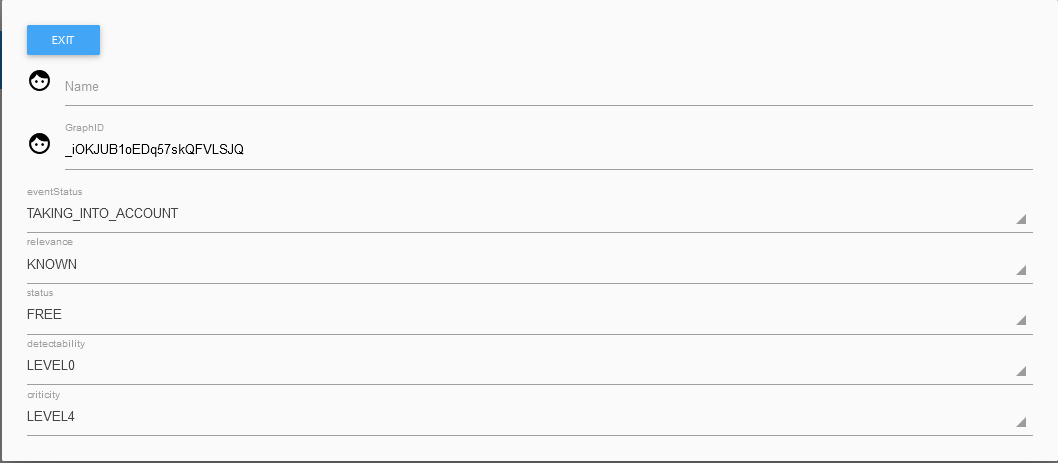
In my Event object model, "canBeusedBy" is the name of a "Stakeholder" list that I want to display in the ListBox.

When I call my editor everything is displayed but not the list?  Here after a copy of the editor displayed:
Editor.PNG

Do you have an idea, a specific example with a list of objects.

Thank you for your help.

Antonio
 

--
You received this message because you are subscribed to the Google Groups "GWT Users" group.
To unsubscribe from this group and stop receiving emails from it, send an email to google-web-toolkit+unsubscribe@googlegroups.com.
To view this discussion on the web visit https://groups.google.com/d/msgid/google-web-toolkit/88ef9293-7280-45d8-9690-439a7131817an%40googlegroups.com.

Tuesday, October 26, 2021

Pb with MaterialListValueBox

Hi all,

I need to create an Editor for an object. This object contains an attribute
List<Stakeholder> canBeUsedBy. I have the method getCanBeUsedBywhich return the list.

In my Editor java side,I set:
@UIField
MaterialListValueBox<List<Stakeholder>> canBeUsedBy;


in my Editor UIBinder side:
<m:MaterialListValueBox ui:field=" canBeUsedBy " placeholder=" canBeUsedBy " />

How can I do to have the String value in the list, because the Stakeholder class just have a method returning a String ans it's that string that I want in my list: The method is getName().

Thanks for your help.

Antonio


--
You received this message because you are subscribed to the Google Groups "GWT Users" group.
To unsubscribe from this group and stop receiving emails from it, send an email to google-web-toolkit+unsubscribe@googlegroups.com.
To view this discussion on the web visit https://groups.google.com/d/msgid/google-web-toolkit/CAKULUq_78vFAQD%3DW7eEH1kDrps7T4HT1KPobRJviGjJtam7y%3DA%40mail.gmail.com.

Friday, October 15, 2021

Re: GWT 2.9 compatiblity with GXT 2.3.1a

The short answer is yes, you need to do this for each such bug you find, and if you have a commercial license, you need to do it yourself - the only way to distribute fixes for things like this is under GPLv2, which may not be something you want in your project as a dependency.

If this is a gwt compiler error, editing bytecode is not sufficient, as GWT consumes the source each time it builds. You probably should also update the bytecode if you update the source files. Only the file in question needs to be edited in this way (HtmlEditor, ListField are the ones I know of).

Do not replace with a .toString() call, in case the model holds an explicit null value, casting to object will use StringBuilder.append(Object), which will be null safe, or pick some other null safe approach.

Sencha's release policy at the time was that they supported the last major release - this means that until GXT 4 was released, GXT 2 was supported, and got updates, but once 4.0.0 was available, GXT 2 was no longer supported. To my knowledge, GXT isn't receiving any updates at all any more. Combined with the license issues, it is hard to do more than discuss the possible fixes and how they could be applied.

On Thursday, October 14, 2021 at 11:08:14 PM UTC-5 RT wrote:
Yes, I agree changing the line in the GXT 2.3.1a ListField.java file from:
sb.append(m.get(prop));

To this:
sb.append(m.get(prop).toString());

Would seemingly fix the issue. However I would then need to compile this to a .class file to replace the one in the gxt-2.3.1a-gwt22,jar that I reference in my project and therein lies the problem.  Must I track down all the dependencies for GXT and GWT so that I can do a full recompile from source just for this one line change? Or can I use a java byte code editor to simply insert the .toString() at the right place in the .class file for ListField? I'm not sure how to do that, so I'll have to read up on byte code editors as that seems easier than a full recompile - if I knew where and how to inject the .toString()

However if the OP already had GXT 2.3.1a working with GWT 2.8.2 then I'm guessing they already had to do this operation, and may be able to provide some insight. Unless they were using Java 7 and this is only a Java 8 issue perhaps.

On Wednesday, October 13, 2021 at 5:48:47 PM UTC-5 nilo...@gmail.com wrote:
The updated JDT probably caused this (so that gwt 2.8.2 can support Java 8 language features) - at a guess you'll need to cast the result of m.get(prop) on that line to Object so that StringBuilder.append correctly uses the Object overload.

On Wednesday, October 13, 2021 at 3:41:52 PM UTC-5 RT wrote:
Hi, I am attempting to update to GWT 2.8.2 from 2.7.0 using GXT 2.3.1a however I get the following error:
Errors in 'jar:file:/war/WEB-INF/lib/gxt-2.3.1a-gwt22.jar!/com/extjs/gxt/ui/client/widget/form/ListField.java'
         Line 322: The method append(boolean) is ambiguous for the type StringBuffer

How were you able to get 2.8.2 working with 2.3.1a?  I'm running Java 8 with compiler compliance set to 1.7

On Thursday, June 11, 2020 at 7:13:31 AM UTC-5 priyako...@gmail.com wrote:
Hi All,

Currently our application has below versions -
1. GWT - 2.8.2
2. GXT - 2.3.1a

We are planning to upgrade GWT from 2.8.2 to 2.9.0. But have query regarding its compatibility towards GXT 2.3.1a.
I have gone through GXT Compatiblity version matrix page, but found nowhere officially mentioned that its supported.
So can you please confirm that GWT 2.9 is officially supported with GXT 2.3.1a?

--
You received this message because you are subscribed to the Google Groups "GWT Users" group.
To unsubscribe from this group and stop receiving emails from it, send an email to google-web-toolkit+unsubscribe@googlegroups.com.
To view this discussion on the web visit https://groups.google.com/d/msgid/google-web-toolkit/82fcc7c6-9397-470c-b76e-0c29dbf7ccdan%40googlegroups.com.