Wednesday, May 15, 2024

Re: gwt-maven-springboot-archetype updated ...

and the version of Spring Bott is updated to 3.2.5

Frank Hossfeld schrieb am Mittwoch, 15. Mai 2024 um 20:36:10 UTC+2:
New version available ... This one fixes the serializationPolicyFilePath issue ... 

Craig Mitchell schrieb am Montag, 4. März 2024 um 12:59:57 UTC+1:
Thank you Frank for making the excellent tool!  Just checked the changes, working perfectly.  🙂

On Monday 4 March 2024 at 7:55:58 pm UTC+11 Frank Hossfeld wrote:
Thanks Craig for contributing. New version is online.

Frank Hossfeld schrieb am Dienstag, 6. Februar 2024 um 08:11:15 UTC+1:
new version is online ... 

Craig Mitchell schrieb am Montag, 5. Februar 2024 um 02:13:45 UTC+1:
Done:  https://github.com/NaluKit/gwt-maven-springboot-archetype/issues/4  Cheers.

On Monday 5 February 2024 at 3:59:55 am UTC+11 Frank Hossfeld wrote:
Please can you open an issue regarding the gwt-servlet-jakarta problem ...

Thanks

Craig Mitchell schrieb am Sonntag, 4. Februar 2024 um 04:57:34 UTC+1:
I noticed that it always logs the error:

ERROR: The serialization policy file '/mywebapp/xxx.gwt.rpc' was not found; did you forget to include it in this deployment?

on the first RPC call.  The RPC still seems to work fine, but wondering if this is an issue or not?


Thanks.

On Saturday 3 February 2024 at 11:10:34 am UTC+11 Craig Mitchell wrote:
Just realised you can also set it in your server pom.xml, in the Spring Boot Maven plugin (configuration > jvmArguments), instead of the launcher:

<plugin>
  <groupId>org.springframework.boot</groupId>
  <artifactId>spring-boot-maven-plugin</artifactId>
  <executions>
    <execution>
      <goals>
        <goal>repackage</goal>
      </goals>
    </execution>
  </executions>
  <configuration>
    <skip>false</skip>
    <jvmArguments>
      -agentlib:jdwp=transport=dt_socket,server=y,suspend=n,address=*:8000
    </jvmArguments>
  </configuration>
</plugin>

On Friday 2 February 2024 at 9:54:46 am UTC+11 Craig Mitchell wrote:
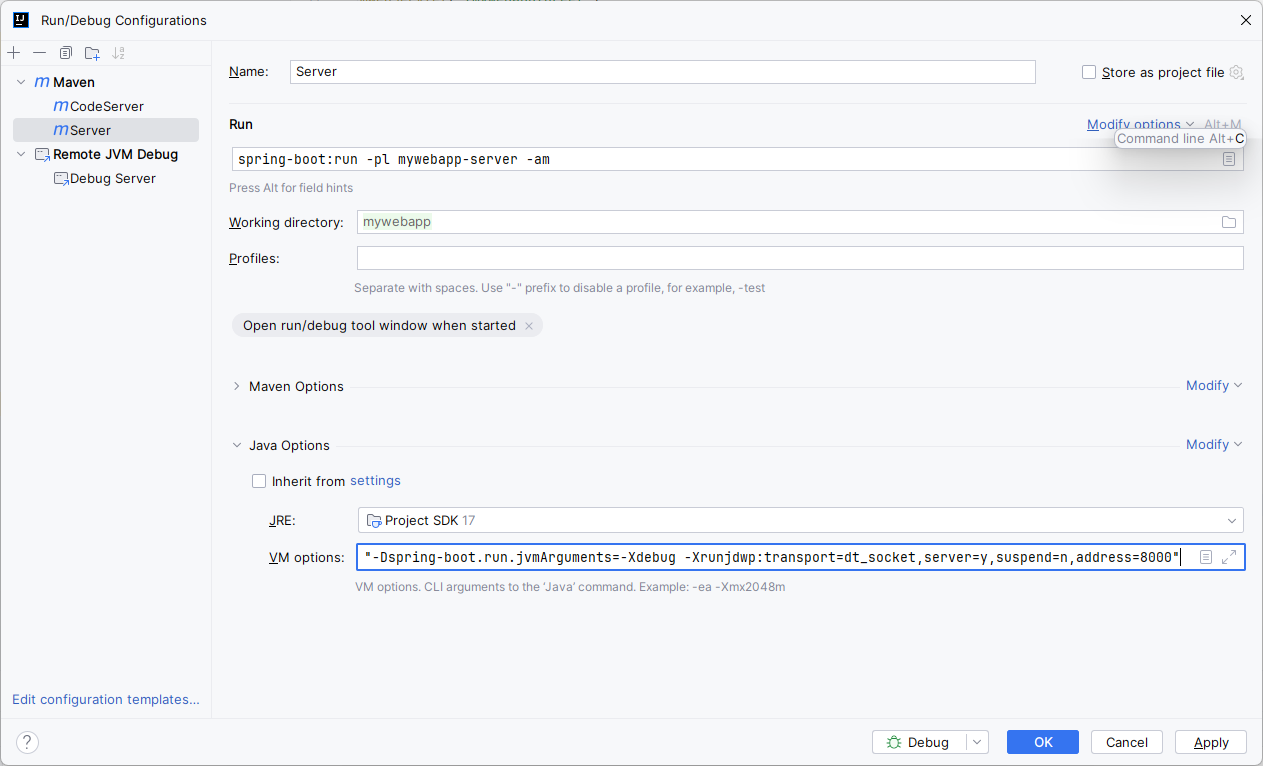
Thanks Thomas.  Now switched to:

-Dspring-boot.run.jvmArguments=-agentlib:jdwp=transport=dt_socket,server=y,suspend=n,address=*:8000

Screen.png

Which also works great.  🙂

On Thursday 1 February 2024 at 7:44:19 pm UTC+11 Thomas Broyer wrote:
You may want to use -agentlib:jdwp (as given by IntelliJ IDEA) rather than the legacy -Xdebug -Xrunjdwp (and then you no longer need the quotes 😉)

And when I say legacy, I really mean it: already in Java 8 -Xdebug does nothing (https://docs.oracle.com/javase/8/docs/technotes/tools/unix/java.html#BABHDABI) and Xrunjdwp is superceded by agentlib (https://docs.oracle.com/javase/8/docs/technotes/tools/unix/java.html#BABDCEGG)

On Wednesday, January 31, 2024 at 10:49:41 PM UTC+1 ma...@craig-mitchell.com wrote:
Thank you!  Working great now (quotes were important).  👍

Screen.png

On Thursday 1 February 2024 at 6:38:47 am UTC+11 Frank Hossfeld wrote:
Mmmh, it might be worth adding this information to the archetype docs.

--
You received this message because you are subscribed to the Google Groups "GWT Users" group.
To unsubscribe from this group and stop receiving emails from it, send an email to google-web-toolkit+unsubscribe@googlegroups.com.
To view this discussion on the web visit https://groups.google.com/d/msgid/google-web-toolkit/dbeab6cf-355f-46da-a67b-0035f8ae6c0an%40googlegroups.com.

Re: gwt-maven-springboot-archetype updated ...

New version available ... This one fixes the serializationPolicyFilePath issue ... 

Craig Mitchell schrieb am Montag, 4. März 2024 um 12:59:57 UTC+1:
Thank you Frank for making the excellent tool!  Just checked the changes, working perfectly.  🙂

On Monday 4 March 2024 at 7:55:58 pm UTC+11 Frank Hossfeld wrote:
Thanks Craig for contributing. New version is online.

Frank Hossfeld schrieb am Dienstag, 6. Februar 2024 um 08:11:15 UTC+1:
new version is online ... 

Craig Mitchell schrieb am Montag, 5. Februar 2024 um 02:13:45 UTC+1:
Done:  https://github.com/NaluKit/gwt-maven-springboot-archetype/issues/4  Cheers.

On Monday 5 February 2024 at 3:59:55 am UTC+11 Frank Hossfeld wrote:
Please can you open an issue regarding the gwt-servlet-jakarta problem ...

Thanks

Craig Mitchell schrieb am Sonntag, 4. Februar 2024 um 04:57:34 UTC+1:
I noticed that it always logs the error:

ERROR: The serialization policy file '/mywebapp/xxx.gwt.rpc' was not found; did you forget to include it in this deployment?

on the first RPC call.  The RPC still seems to work fine, but wondering if this is an issue or not?


Thanks.

On Saturday 3 February 2024 at 11:10:34 am UTC+11 Craig Mitchell wrote:
Just realised you can also set it in your server pom.xml, in the Spring Boot Maven plugin (configuration > jvmArguments), instead of the launcher:

<plugin>
  <groupId>org.springframework.boot</groupId>
  <artifactId>spring-boot-maven-plugin</artifactId>
  <executions>
    <execution>
      <goals>
        <goal>repackage</goal>
      </goals>
    </execution>
  </executions>
  <configuration>
    <skip>false</skip>
    <jvmArguments>
      -agentlib:jdwp=transport=dt_socket,server=y,suspend=n,address=*:8000
    </jvmArguments>
  </configuration>
</plugin>

On Friday 2 February 2024 at 9:54:46 am UTC+11 Craig Mitchell wrote:
Thanks Thomas.  Now switched to:

-Dspring-boot.run.jvmArguments=-agentlib:jdwp=transport=dt_socket,server=y,suspend=n,address=*:8000

Screen.png

Which also works great.  🙂

On Thursday 1 February 2024 at 7:44:19 pm UTC+11 Thomas Broyer wrote:
You may want to use -agentlib:jdwp (as given by IntelliJ IDEA) rather than the legacy -Xdebug -Xrunjdwp (and then you no longer need the quotes 😉)

And when I say legacy, I really mean it: already in Java 8 -Xdebug does nothing (https://docs.oracle.com/javase/8/docs/technotes/tools/unix/java.html#BABHDABI) and Xrunjdwp is superceded by agentlib (https://docs.oracle.com/javase/8/docs/technotes/tools/unix/java.html#BABDCEGG)

On Wednesday, January 31, 2024 at 10:49:41 PM UTC+1 ma...@craig-mitchell.com wrote:
Thank you!  Working great now (quotes were important).  👍

Screen.png

On Thursday 1 February 2024 at 6:38:47 am UTC+11 Frank Hossfeld wrote:
Mmmh, it might be worth adding this information to the archetype docs.
--
You received this message because you are subscribed to the Google Groups "GWT Users" group.
To unsubscribe from this group and stop receiving emails from it, send an email to google-web-toolkit+unsubscribe@googlegroups.com.
To view this discussion on the web visit https://groups.google.com/d/msgid/google-web-toolkit/d6b24035-3b55-475c-b6ea-aafa47f69fd2n%40googlegroups.com.

Thursday, May 9, 2024

Re: Unable to Access GWT CodeServer Outside of WSL Environment

I found that info after sending the reply. Thanks for your help!

On Thursday, May 9, 2024 at 9:15:13 AM UTC+2 Anders Kobberup wrote:
Hi Craig

That works - awesome!
We have been using GWT since 2010 for our monolith of a project and have never found the need to change the maven plugin. Whats the improvements over the old plugin?

Kind regards - and thanks again!

/Anders
On Thursday, May 9, 2024 at 6:02:22 AM UTC+2 Craig Mitchell wrote:
I haven't used that old plugin for awhile, but I think you need to set the  bindAddress to 0.0.0.0:  https://gwt-maven-plugin.github.io/gwt-maven-plugin/eclipse-mojo.html#bindAddress

You might like to do a test with generating a sample app with https://github.com/tbroyer/gwt-maven-archetypes which will use https://github.com/tbroyer/gwt-maven-plugin instead, and see if that works.  More instructions here:  https://www.gwtproject.org/gettingstarted-v2.html

On Thursday 9 May 2024 at 1:36:30 am UTC+10 Anders Kobberup wrote:
I am encountering an issue with accessing the GWT CodeServer from outside the Windows Subsystem for Linux (WSL) environment. I'm hoping to get some guidance or assistance on resolving this issue.

The problem arises when attempting to access the GWT CodeServer running within the WSL environment from a browser outside of WSL.
Specifically, I can access the GWT application's main page from my browser by navigating to localhost:8001, but I cannot connect to the CodeServer at http://localhost:8501.

From within the WSL terminal i can telnet the port and it looks good, but i cannot from the outside host.

My theory is that the codeserver only accepts connections from localhost - but i do not know how to set a host="0.0.0.0" or something like that on the jetty running the codeserver.

We use the org.codehaus.mojo gwt-maven-plugin with these settings:
<plugin>
    <groupId>org.codehaus.mojo</groupId>
    <artifactId>gwt-maven-plugin</artifactId>
    <version>2.10.0</version>
    <configuration>
        <localWorkers>1</localWorkers>
        <skip>true</skip>
        <draftCompile>true</draftCompile>
        <noServer>true</noServer>
        <compileReport>false</compileReport>
        <logLevel>INFO</logLevel>
        <style>OBF</style>
        <sourceLevel>auto</sourceLevel>
        <extraJvmArgs>-Xmx7G --add-opens java.base/java.lang=ALL-UNNAMED</extraJvmArgs>
        <workDir/>
        <module>com.toh.manager.ManagerclientDev</module>
        <strict>true</strict>
        <port>8001</port>
        <debugPort>8010</debugPort>
        <codeServerPort>8501</codeServerPort>
        <runTarget>managerclient.html</runTarget>
        <hostedWebapp>${project.basedir}/src/main/webapp</hostedWebapp>
        <persistentunitcache>true</persistentunitcache>
        <persistentunitcachedir>/tmp/gwt-${project.build.finalName}</persistentunitcachedir>
    </configuration>
</plugin>

Please let me know if you need anymore information

--
You received this message because you are subscribed to the Google Groups "GWT Users" group.
To unsubscribe from this group and stop receiving emails from it, send an email to google-web-toolkit+unsubscribe@googlegroups.com.
To view this discussion on the web visit https://groups.google.com/d/msgid/google-web-toolkit/4774b340-142b-4e21-a305-fe016e9567b0n%40googlegroups.com.

Wednesday, May 8, 2024

Re: Unable to Access GWT CodeServer Outside of WSL Environment

Hi Craig

That works - awesome!
We have been using GWT since 2010 for our monolith of a project and have never found the need to change the maven plugin. Whats the improvements over the old plugin?

Kind regards - and thanks again!

/Anders
On Thursday, May 9, 2024 at 6:02:22 AM UTC+2 Craig Mitchell wrote:
I haven't used that old plugin for awhile, but I think you need to set the  bindAddress to 0.0.0.0:  https://gwt-maven-plugin.github.io/gwt-maven-plugin/eclipse-mojo.html#bindAddress

You might like to do a test with generating a sample app with https://github.com/tbroyer/gwt-maven-archetypes which will use https://github.com/tbroyer/gwt-maven-plugin instead, and see if that works.  More instructions here:  https://www.gwtproject.org/gettingstarted-v2.html

On Thursday 9 May 2024 at 1:36:30 am UTC+10 Anders Kobberup wrote:
I am encountering an issue with accessing the GWT CodeServer from outside the Windows Subsystem for Linux (WSL) environment. I'm hoping to get some guidance or assistance on resolving this issue.

The problem arises when attempting to access the GWT CodeServer running within the WSL environment from a browser outside of WSL.
Specifically, I can access the GWT application's main page from my browser by navigating to localhost:8001, but I cannot connect to the CodeServer at http://localhost:8501.

From within the WSL terminal i can telnet the port and it looks good, but i cannot from the outside host.

My theory is that the codeserver only accepts connections from localhost - but i do not know how to set a host="0.0.0.0" or something like that on the jetty running the codeserver.

We use the org.codehaus.mojo gwt-maven-plugin with these settings:
<plugin>
    <groupId>org.codehaus.mojo</groupId>
    <artifactId>gwt-maven-plugin</artifactId>
    <version>2.10.0</version>
    <configuration>
        <localWorkers>1</localWorkers>
        <skip>true</skip>
        <draftCompile>true</draftCompile>
        <noServer>true</noServer>
        <compileReport>false</compileReport>
        <logLevel>INFO</logLevel>
        <style>OBF</style>
        <sourceLevel>auto</sourceLevel>
        <extraJvmArgs>-Xmx7G --add-opens java.base/java.lang=ALL-UNNAMED</extraJvmArgs>
        <workDir/>
        <module>com.toh.manager.ManagerclientDev</module>
        <strict>true</strict>
        <port>8001</port>
        <debugPort>8010</debugPort>
        <codeServerPort>8501</codeServerPort>
        <runTarget>managerclient.html</runTarget>
        <hostedWebapp>${project.basedir}/src/main/webapp</hostedWebapp>
        <persistentunitcache>true</persistentunitcache>
        <persistentunitcachedir>/tmp/gwt-${project.build.finalName}</persistentunitcachedir>
    </configuration>
</plugin>

Please let me know if you need anymore information

--
You received this message because you are subscribed to the Google Groups "GWT Users" group.
To unsubscribe from this group and stop receiving emails from it, send an email to google-web-toolkit+unsubscribe@googlegroups.com.
To view this discussion on the web visit https://groups.google.com/d/msgid/google-web-toolkit/4de1ff5d-d008-4b64-bc46-f71f58c14040n%40googlegroups.com.

Re: Unable to Access GWT CodeServer Outside of WSL Environment

I haven't used that old plugin for awhile, but I think you need to set the  bindAddress to 0.0.0.0:  https://gwt-maven-plugin.github.io/gwt-maven-plugin/eclipse-mojo.html#bindAddress

You might like to do a test with generating a sample app with https://github.com/tbroyer/gwt-maven-archetypes which will use https://github.com/tbroyer/gwt-maven-plugin instead, and see if that works.  More instructions here:  https://www.gwtproject.org/gettingstarted-v2.html

On Thursday 9 May 2024 at 1:36:30 am UTC+10 Anders Kobberup wrote:
I am encountering an issue with accessing the GWT CodeServer from outside the Windows Subsystem for Linux (WSL) environment. I'm hoping to get some guidance or assistance on resolving this issue.

The problem arises when attempting to access the GWT CodeServer running within the WSL environment from a browser outside of WSL.
Specifically, I can access the GWT application's main page from my browser by navigating to localhost:8001, but I cannot connect to the CodeServer at http://localhost:8501.

From within the WSL terminal i can telnet the port and it looks good, but i cannot from the outside host.

My theory is that the codeserver only accepts connections from localhost - but i do not know how to set a host="0.0.0.0" or something like that on the jetty running the codeserver.

We use the org.codehaus.mojo gwt-maven-plugin with these settings:
<plugin>
    <groupId>org.codehaus.mojo</groupId>
    <artifactId>gwt-maven-plugin</artifactId>
    <version>2.10.0</version>
    <configuration>
        <localWorkers>1</localWorkers>
        <skip>true</skip>
        <draftCompile>true</draftCompile>
        <noServer>true</noServer>
        <compileReport>false</compileReport>
        <logLevel>INFO</logLevel>
        <style>OBF</style>
        <sourceLevel>auto</sourceLevel>
        <extraJvmArgs>-Xmx7G --add-opens java.base/java.lang=ALL-UNNAMED</extraJvmArgs>
        <workDir/>
        <module>com.toh.manager.ManagerclientDev</module>
        <strict>true</strict>
        <port>8001</port>
        <debugPort>8010</debugPort>
        <codeServerPort>8501</codeServerPort>
        <runTarget>managerclient.html</runTarget>
        <hostedWebapp>${project.basedir}/src/main/webapp</hostedWebapp>
        <persistentunitcache>true</persistentunitcache>
        <persistentunitcachedir>/tmp/gwt-${project.build.finalName}</persistentunitcachedir>
    </configuration>
</plugin>

Please let me know if you need anymore information

--
You received this message because you are subscribed to the Google Groups "GWT Users" group.
To unsubscribe from this group and stop receiving emails from it, send an email to google-web-toolkit+unsubscribe@googlegroups.com.
To view this discussion on the web visit https://groups.google.com/d/msgid/google-web-toolkit/d4bfca14-1d70-4b0e-b09e-964fa8568caan%40googlegroups.com.

Unable to Access GWT CodeServer Outside of WSL Environment

I am encountering an issue with accessing the GWT CodeServer from outside the Windows Subsystem for Linux (WSL) environment. I'm hoping to get some guidance or assistance on resolving this issue.

The problem arises when attempting to access the GWT CodeServer running within the WSL environment from a browser outside of WSL.
Specifically, I can access the GWT application's main page from my browser by navigating to localhost:8001, but I cannot connect to the CodeServer at http://localhost:8501.

From within the WSL terminal i can telnet the port and it looks good, but i cannot from the outside host.

My theory is that the codeserver only accepts connections from localhost - but i do not know how to set a host="0.0.0.0" or something like that on the jetty running the codeserver.

We use the org.codehaus.mojo gwt-maven-plugin with these settings:
<plugin>
    <groupId>org.codehaus.mojo</groupId>
    <artifactId>gwt-maven-plugin</artifactId>
    <version>2.10.0</version>
    <configuration>
        <localWorkers>1</localWorkers>
        <skip>true</skip>
        <draftCompile>true</draftCompile>
        <noServer>true</noServer>
        <compileReport>false</compileReport>
        <logLevel>INFO</logLevel>
        <style>OBF</style>
        <sourceLevel>auto</sourceLevel>
        <extraJvmArgs>-Xmx7G --add-opens java.base/java.lang=ALL-UNNAMED</extraJvmArgs>
        <workDir/>
        <module>com.toh.manager.ManagerclientDev</module>
        <strict>true</strict>
        <port>8001</port>
        <debugPort>8010</debugPort>
        <codeServerPort>8501</codeServerPort>
        <runTarget>managerclient.html</runTarget>
        <hostedWebapp>${project.basedir}/src/main/webapp</hostedWebapp>
        <persistentunitcache>true</persistentunitcache>
        <persistentunitcachedir>/tmp/gwt-${project.build.finalName}</persistentunitcachedir>
    </configuration>
</plugin>

Please let me know if you need anymore information

--
You received this message because you are subscribed to the Google Groups "GWT Users" group.
To unsubscribe from this group and stop receiving emails from it, send an email to google-web-toolkit+unsubscribe@googlegroups.com.
To view this discussion on the web visit https://groups.google.com/d/msgid/google-web-toolkit/50809691-427f-40e1-b492-b576bfe1e17en%40googlegroups.com.

Wednesday, May 1, 2024

Re: Seeking Advice on Legacy Application Migration Strategy

thank you @Colin 

I started by  upgrading gwt Only  from version 2.8.2 To 2.10.0 and I kept java 8 and  GXT 2.3.1a-gwt22
In  my jetty-env.xml file  i had  org.eclipse.jetty.webapp.WebAppContext as a configurationClass, so It cause fd ollowing error when launching java.lang.ClassNotFoundException: org.eclipse.jetty.webapp.WebAppContext
at java.lang.ClassLoader.findClass(ClassLoader.java:523)
at java.lang.ClassLoader.loadClass(ClassLoader.java:418)
at java.lang.ClassLoader.loadClass(ClassLoader.java:351)
at org.eclipse.jetty.webapp.WebAppClassLoader.loadClass(WebAppClassLoader.java:487)
at com.google.gwt.dev.shell.jetty.JettyLauncher$WebAppContextWithReload$WebAppClassLoaderExtension.loadClass(JettyLauncher.java:458)
at java.lang.ClassLoader.loadClass(ClassLoader.java:351)
at org.eclipse.jetty.util.Loader.loadClass(Loader.java:64)
at org.eclipse.jetty.xml.XmlConfiguration$JettyXmlConfiguration.nodeClass(XmlConfiguration.java:477)
at org.eclipse.jetty.xml.XmlConfiguration$JettyXmlConfiguration.configure(XmlConfiguration.java:417)
at org.eclipse.jetty.xml.XmlConfiguration.configure(XmlConfiguration.java:364)
at org.eclipse.jetty.plus.webapp.EnvConfiguration.lambda$configure$0(EnvConfiguration.java:120)
at org.eclipse.jetty.webapp.WebAppClassLoader.runWithServerClassAccess(WebAppClassLoader.java:138)
at org.eclipse.jetty.plus.webapp.EnvConfiguration.configure(EnvConfiguration.java:118)
at org.eclipse.jetty.webapp.WebAppContext.configure(WebAppContext.java:498)
at org.eclipse.jetty.webapp.WebAppContext.startContext(WebAppContext.java:1409)
at org.eclipse.jetty.server.handler.ContextHandler.doStart(ContextHandler.java:910)
at org.eclipse.jetty.servlet.ServletContextHandler.doStart(ServletContextHandler.java:288)
at org.eclipse.jetty.webapp.WebAppContext.doStart(WebAppContext.java:524)
at com.google.gwt.dev.shell.jetty.JettyLauncher$WebAppContextWithReload.doStart(JettyLauncher.java:568)
at org.eclipse.jetty.util.component.AbstractLifeCycle.start(AbstractLifeCycle.java:73)
at org.eclipse.jetty.util.component.ContainerLifeCycle.start(ContainerLifeCycle.java:169)
at org.eclipse.jetty.util.component.ContainerLifeCycle.doStart(ContainerLifeCycle.java:110)
at org.eclipse.jetty.server.handler.AbstractHandler.doStart(AbstractHandler.java:97)
at org.eclipse.jetty.util.component.AbstractLifeCycle.start(AbstractLifeCycle.java:73)
at org.eclipse.jetty.util.component.ContainerLifeCycle.start(ContainerLifeCycle.java:169)
at org.eclipse.jetty.server.Server.start(Server.java:423)
at org.eclipse.jetty.util.component.ContainerLifeCycle.doStart(ContainerLifeCycle.java:110)
at org.eclipse.jetty.server.handler.AbstractHandler.doStart(AbstractHandler.java:97)
at org.eclipse.jetty.server.Server.doStart(Server.java:387)
at org.eclipse.jetty.util.component.AbstractLifeCycle.start(AbstractLifeCycle.java:73)
at com.google.gwt.dev.shell.jetty.JettyLauncher.start(JettyLauncher.java:776)
at com.google.gwt.dev.DevMode.doStartUpServer(DevMode.java:636)
at com.google.gwt.dev.DevModeBase.startUp(DevModeBase.java:898)
at com.google.gwt.dev.DevModeBase.run(DevModeBase.java:705)
at com.google.gwt.dev.DevMode.main(DevMode.java:432)
Suppressed: java.lang.ClassNotFoundException: org.eclipse.jetty.webapp.WebAppContext
at java.net.URLClassLoader.findClass(URLClassLoader.java:387)
at org.eclipse.jetty.webapp.WebAppClassLoader.findClass(WebAppClassLoader.java:629)
at org.eclipse.jetty.webapp.WebAppClassLoader.loadClass(WebAppClassLoader.java:511)
... 31 more

Le vendredi 26 avril 2024 à 15:28:09 UTC+2, Colin Alworth a écrit :
You might run into issues with such an old version of GXT when using a new GWT version - take a look at https://groups.google.com/g/google-web-toolkit/c/If897MPqvw0/m/bSWnmuz9BwAJ for a summary of how to update GXT 2.3.1a-gwt22.

With GWT updated to 2.9.0 or beyond, you will be able to run on Java 11 (see https://www.gwtproject.org/release-notes.html#Release_Notes_2_9_0).


On Friday, April 26, 2024 at 7:59:27 AM UTC-5 wejden...@gmail.com wrote:
Many thanks @frank Hossfeld, 
I am so excited to start it .. it is clear 
please feel free to share any references or links that can help me in that adventure .

thank you
wm

Le ven. 26 avr. 2024 à 11:50, 'Frank Hossfeld' via GWT Users <google-we...@googlegroups.com> a écrit :
GWT 2.8.2 is pretty old - nearly seven years - and i am not sure, if the GWT 2.8.2 will work with Java 11

Migrating to the latest version of GWT will give you some benefits. IIRC GWT 2.8.2 generates at least 5 JS-files where GWT 2.11.0 only generates 2. This will speed up the build. Also, there is a security issue in older GWT versions (in case you are using RPC). 

To do so, separate your code in client-, shared- and server-modules (as Craig already mentioned).  Take a look here: https://github.com/tbroyer/gwt-maven-archetypes or here https://github.com/NaluKit/gwt-maven-springboot-archetype. This should give you an idea, how your project look like after the separation. Once done, it should be possible to use different Java versions on the client and server side.

Once you have separate your code, you can update the GWT version. My first step would be to update to GWT 2.10.0. I would do this, because to GWT 2.10.0 works with the old javax stuff on the server side and give you the opportunity to patch GXT without updating the server stuff.  (IIRC you need to patch two classes). After the patch you can move to GWT 2.11.0 and Java 11 and fix the other issues by updating versions, etc.

Wejden Mrabti schrieb am Freitag, 26. April 2024 um 09:12:33 UTC+2:
thank you for your answer @craig Mitchell
if i want to continue hibernate 6 , how to do launch gwt application on java 11 ? 
is it possible to continue working like this ? what do you think?
Le vendredi 26 avril 2024 à 02:22:52 UTC+2, Craig Mitchell a écrit :
It'd be hard to answer that question, as we don't have all the details.  As this is a GWT forum, I'd say, migrate GWT to the latest version first.  But that might actually be bad advice, just depends on your project.

My gut feel is you'd be best to decouple the front end and back end first.

On Friday 26 April 2024 at 2:32:17 am UTC+10 Wejden Mrabti wrote:

Hello GWT Users Community,

I'm currently working on a large legacy application stack, using Java 8, Hibernate version 5.3.20.Final, and Hibernate Search 5.11.5.Final. Our frontend technology stack includes GWT version 2.8.2 and GXT version 2.3.1a-gwt22. Fontend and backend arent well de-coupled.

In my initial approach to modernize the application, I began by migrating Hibernate to version 6.2, assuming it would be the easiest step. However, I encountered an issue where Hibernate 6.2 requires transitioning to Jakarta Persistence. When attempting to compile parts of my codebase, I received the following error:

java.lang.UnsupportedClassVersionError: jakarta/persistence/Transient has been compiled by a more recent version of the Java Runtime (class file version 55.0), this version of the Java Runtime only recognizes class file versions up to 52.0

This suggests that I need to execute my code with JDK 11. However, when attempting to do so, I encountered the following issue:

[ERROR] Found resouce but unrecognized URL format: 'jrt:/java.sql/javax/sql/DataSource.class' java.lang.NoClassDefFoundError: javax/sql/DataSource

After reviewing your discussions in the GWT contributors group, I'm questioning whether starting with the Hibernate migration is the right approach. Should I instead prioritize migrating Java or perhaps GWT? I would greatly appreciate your insights and advice based on your experiences.

Thank you,

WM

--
You received this message because you are subscribed to the Google Groups "GWT Users" group.
To unsubscribe from this group and stop receiving emails from it, send an email to google-web-tool...@googlegroups.com.
To view this discussion on the web visit https://groups.google.com/d/msgid/google-web-toolkit/a91eb3fa-af37-4c37-bc61-010bbd151763n%40googlegroups.com.


--
Best Regards,
Wejden MRABTI

Ingénieur étude et développement

--
You received this message because you are subscribed to the Google Groups "GWT Users" group.
To unsubscribe from this group and stop receiving emails from it, send an email to google-web-toolkit+unsubscribe@googlegroups.com.
To view this discussion on the web visit https://groups.google.com/d/msgid/google-web-toolkit/db1cfa0b-44ce-4bd3-a803-3e1e86b0e2f6n%40googlegroups.com.